What to do
Step by step.
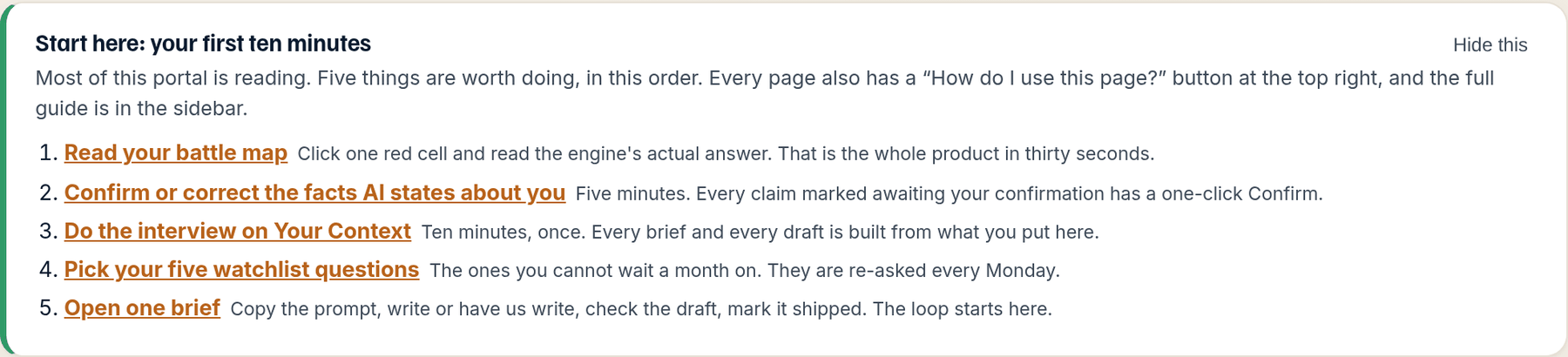
- Open the Battle Map and click one red cell. Read the engine's actual answer, word for word, with your competitors' names highlighted. Now you know what the product measures.
- Open Accuracy. Every claim under Stated as fact, please confirm has a one-click This claim is correct button. Confirm the true ones; supply the fact for the wrong ones. Five minutes.
- Open Your Context and start the interview: a few sentences per question, about ten minutes. Every brief and every draft check reads from what you put here.
- Open Your Questions and tick up to five for your watchlist. Those are re-asked every Monday and shown on your Overview, so you are not waiting a month on the ones you care about.
- Open one question on the Work list and read its brief. On The Map, press Copy the prompt and hand it to your writer or paste it into any AI. On Done for you, read it to see what we are about to write.
What happens next. The next monthly run lands in the last week of the month. Anything you confirmed or corrected is checked against the new answers, and your trend gets its second point.
The portal is mostly reading, and it reads better once you have done five short things. This is the order that pays off, because each one makes the next one more useful: the map tells you what the engines say, the facts you confirm make the accuracy check real, the interview gives the briefs something to write from, the watchlist keeps the questions you care about warm, and the brief is where the loop starts.
How to read it
What the screen is telling you.
- The Overview is your month on one screen: four tiles (mention rate, share of voice, recommended first, unclaimed questions), what changed since last month, and your trend once you have two measured months.
- The Start here card on the Overview is this same list. Hide it once you have done the five things.
- Explain this page, at the top of every tab, answers questions about your own numbers in plain language. It reads only your measured data.
Questions
People ask.
- Why did a number drop when nothing changed?
- Engines are probabilistic and their answers move. Watch the trend, not the tile. One month is a signal; two months in the same direction is a pattern.
- Share of voice went up but I saw answers we lost. Which is it?
- Both. The What changed strip shows answers gained, lost and unchanged side by side, so the net never hides the losses. The Battle Map's What changed lens shows exactly which cells.
- Are mention rate and share of voice the same thing?
- No. Mention rate is the share of all captured answers that name you. Share of voice is your mentions as a share of everyone's mentions, competitors included. Hover any tile for its formula.