What to do
Step by step.
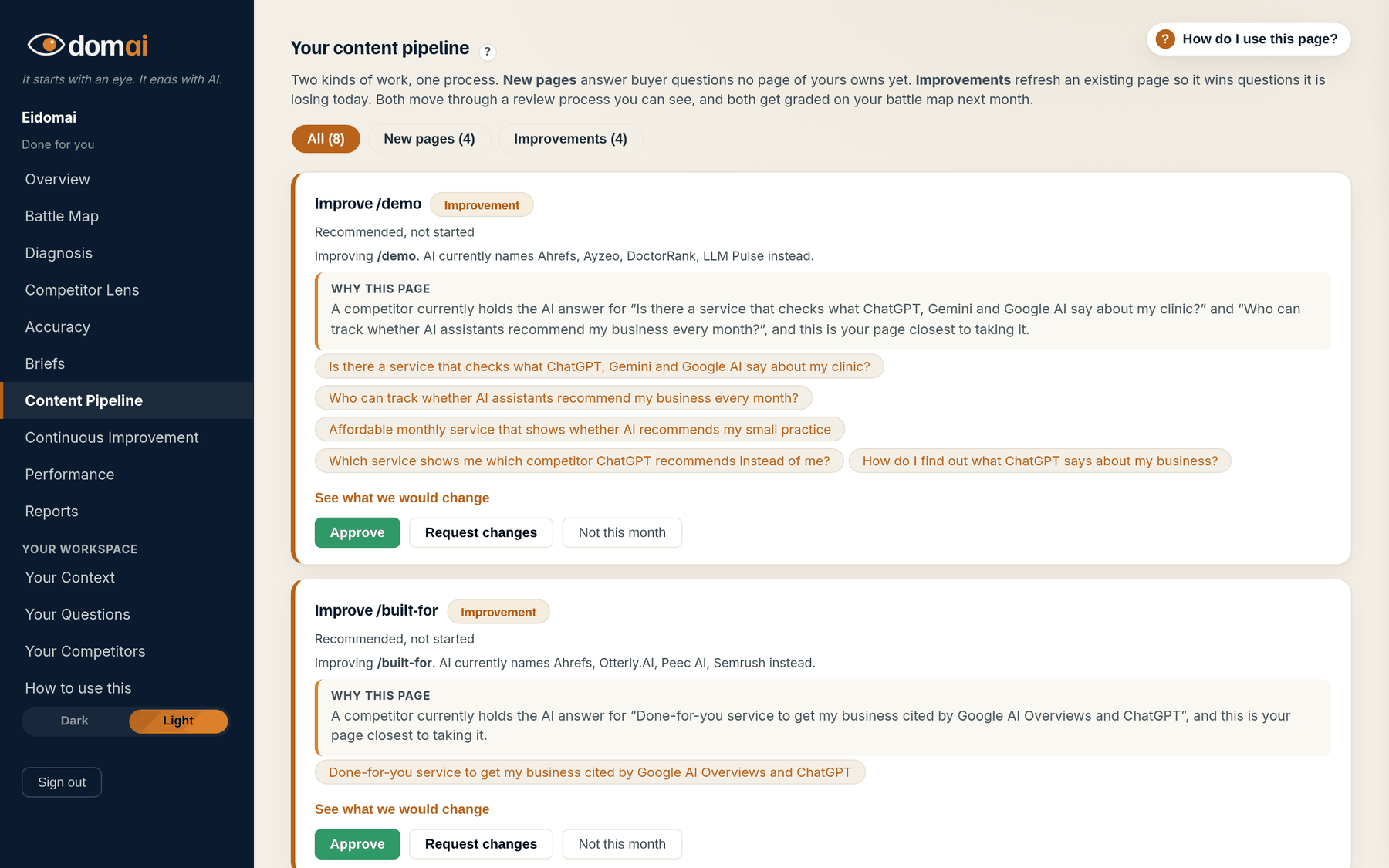
- Read the count at the top: n waiting on you. Those are the cards that need a decision.
- Recommended cards are proposals. Approve authorizes the work, Request changes says what to change, Not this month parks it. Nothing publishes from that button.
- Ready for your review cards carry a full draft. Read it. Fill any highlighted placeholder with the real fact. Then Approve this content, Request changes, or Just comment.
- Attach a photo, a logo or a document to a piece from its card when it helps the content.
- Watch the status move: Approved, In production on your site, Published. The card links to the live page when it is up.
What happens next. After you approve a draft, we build the content on your site as a draft, run the final checks, and a person publishes it. It is marked shipped for you and graded by the next run.
On Done for you, the writing is ours and the approval is yours. The Content Pipeline is where the two meet. Every piece of content we are working on is a card with a status you can read at a glance, and the cards waiting on you say so at the top.
The rule is the same as everywhere else in the loop: nothing goes live without a check and your approval. The brief comes from your diagnosis, the draft is read against your ledger before you see it, you fill any placeholder we would not guess at, and a person publishes only after you say yes.
How to read it
What the screen is telling you.
- Two tracks: New content, and Content improvements to your existing pages. Each card states the questions it is meant to earn and who holds them today. See what we would change opens the improvement plan on a card.
- Statuses, in order: Recommended, not started; Requested, waiting for our writer; Queued for writer; In draft; Ready for your review; Rewrite requested; Approved; In production on your site; Published. Not planned means we have said why on the card.
- A card that earned its keep says Verified, now visible on your battle map.
- On The Map, this tab keeps your own work record instead (every task you checked, shipped or had measured) and shows a sample of what Done for you adds.
Questions
People ask.
- Does approving publish the content?
- No. Approve authorizes the work. A person builds the content on your site as a draft, runs the final checks, and publishes it. You never see content go live that you have not read.
- How many pieces of content a month?
- Six, a mix of new pages and updates to the pages you already have, written from your briefs, read against your facts before you see them, published and placed after you approve.
- What is the difference between Request changes and Just comment?
- Request changes sends the draft back and moves the card to Rewrite requested. Just comment leaves a note for the writer and the card where it is, for something that does not need a rewrite.