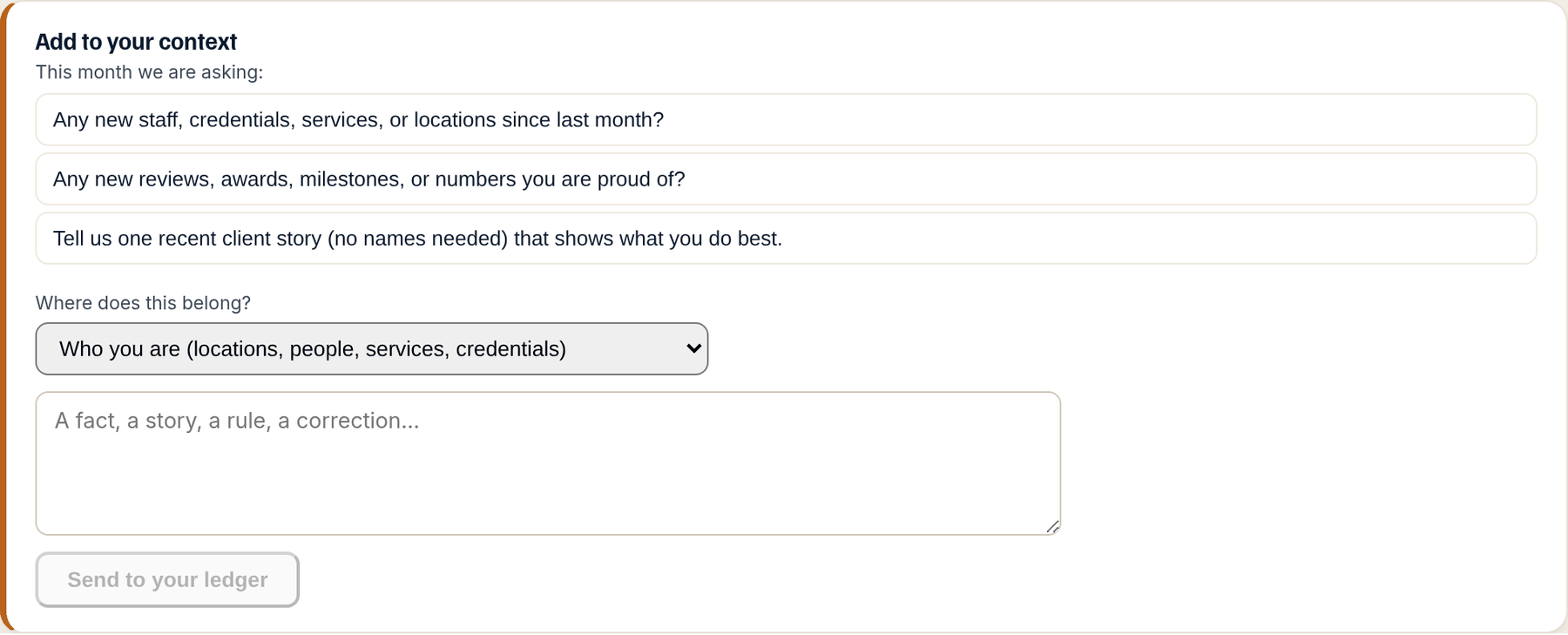
What to do
Step by step.
- On Your Context, find Add to your context. If This month we are asking is showing, those are the three monthly questions; answer them first.
- Choose Where does this belong (one of the seven dimensions) so the note lands in the right place.
- Type the fact, the story, the rule or the correction in your own words, and press Send to your ledger.
- It shows under Pending with a chip for its kind. Withdraw it from there if you sent it by mistake.
What happens next. After a person has read it, the note appears as an entry with its provenance after the next engine run, and the briefs and checks use it from then on.
Businesses change and the engines are slow to notice. The add-to-context box is how the ledger keeps up: one note, in your own words, filed where it belongs. A person reads it, shapes it into a fact your content can state, and it joins the ledger with your name and the date on it.
The monthly questions live in the same box. They are three questions chosen from what the last run could not judge or the briefs could not fill, and answering them is the cheapest way to make next month's briefs better.
How to read it
What the screen is telling you.
- Notes are read by a person before they become facts your content can state, because they are written in your voice and need shaping. Corrections filed with Flag as wrong skip that step and apply within the hour; a note does not.
- The three monthly questions are chosen from what the last run could not judge or the briefs could not fill. Ten minutes on them keeps the record current.
- Nothing here touches your website. A note changes what the next brief, check and verdict know.
Questions
People ask.
- What is worth a note?
- Anything an engine could get wrong about you a month from now. A change of hours or address, a service added or dropped, a new credential or award, a new market, a story you would want in your content, a claim you never want made.
- How is a note different from a correction?
- A correction fixes an entry that exists and applies within the hour. A note adds something new and is read by a person first. If an existing entry is wrong, use Flag as wrong on it instead of a note.
- Can I attach a document?
- Not to a note. On Done for you, attach documents to a piece from its card on the Content Pipeline. Otherwise, send a support request at eidom.ai/support with the document and say which entry it supports.