What to do
Step by step.
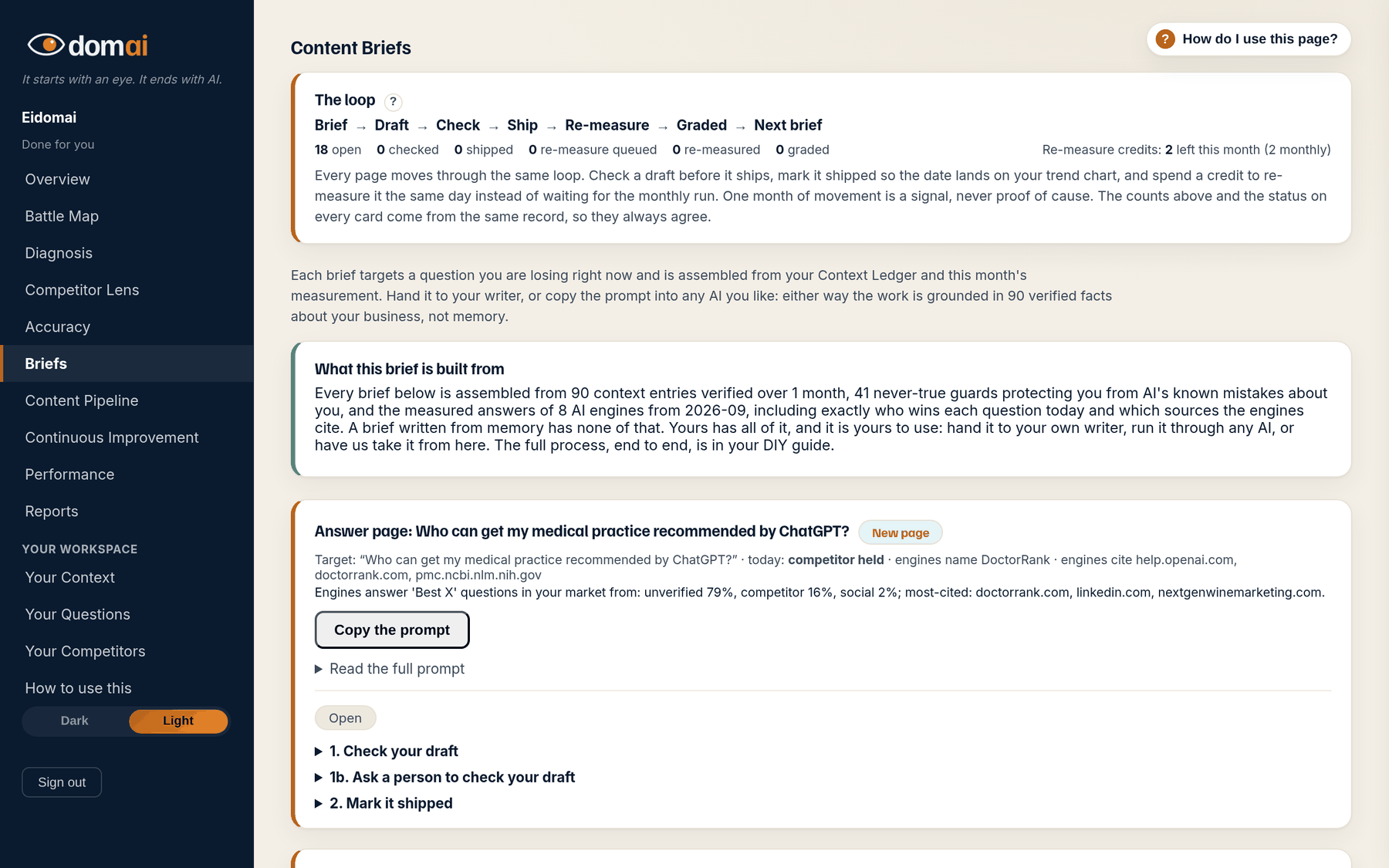
- Read the loop strip at the top: Brief, Draft, Check, Ship, Re-measure, Graded. The counts under it show where every task stands; the card statuses come from the same record.
- Pick a brief. Each card names its target question, who is named today (you are named, partly visible, competitor held, open territory), which engines name whom, and what they cite.
- Read What this brief is built from at the bottom of the card: the measured answers and the facts on your ledger that the prompt draws on. Every fact in the prompt is verified; anything else must stay a placeholder.
- Decide who writes it. On The Map, press Copy the prompt and write the content. On Done for you, this is what our writer works from; you see the draft on the Content Pipeline.
What happens next. Once the content is written, the numbered sections on the brief take it the rest of the way: check the draft, mark it shipped, and (on Done for you) re-measure it today.
The map keeps score; the content earns it. A brief is the plan for one piece of content, written from your own measurement: which question it is meant to earn, who the engines name for it today, what they cite when they do, and a prompt that carries every verified fact the content can state.
The loop on this tab is the same on every plan. Brief, draft, check, ship, re-measure, graded. What changes by plan is who does the writing: you from the prompt on The Map, and us on Done for you.
How to read it
What the screen is telling you.
- Two kinds of brief: New content, for a question nobody on your site answers, and Improve existing content, which names the page, what stays (do not remove; these already work) and what changes.
- The stage chip on each card is where the task is: Open, Draft checked, Shipped, Re-measure queued, Re-measured, Graded by the monthly run.
- A task you opened from the Work list tab is marked This is the task you chose on the Work list tab; More tasks from your diagnosis lists the rest.
- A brief is never published by itself. Nothing on this tab changes your website; content goes live when you publish it, and the check reads it before that.
Questions
People ask.
- Where do the briefs come from?
- From the Work list tab. Every question you are losing or splitting has a plan there, and the brief is the writing half of that plan: the content that would earn the answer, built from what the engines cite and the facts on your ledger.
- Why is the prompt full of placeholders?
- Because the ledger does not hold those facts yet. A placeholder is a fact we would not guess at. Fill it with the real thing, or do the interview on Your Context and the next brief comes with it filled.
- How many briefs should I work at once?
- One or two. One piece of content written properly does more than five written thin, and the measurement runs every month, so there is no reason to rush the whole map at once.