Step by step.
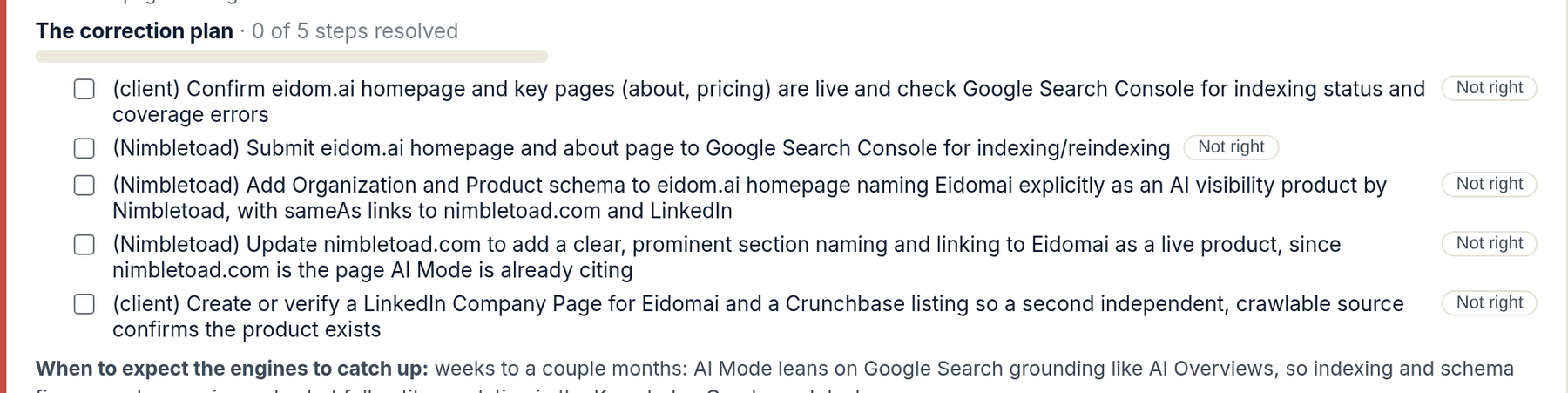
- On the Incorrect or Out of date tab, under a claim, find The correction plan with its count of steps resolved. Each step is one thing to change at one source: a directory profile, a page on your site, a listing, a reference.
- Do the steps that are yours, such as a directory profile where the login is yours, and tick the checkbox. The step strikes through and the count moves. On Done for you, we do the rest and tick them as we go.
- If a step rests on something that is not true about you, press Not right. Type one line saying what is wrong, for example that a domain the plan calls a third party was your own earlier business. Press File it.
- Press Mark this correction complete on the claim once the sources say the right thing. The next measurement shows whether the engine stopped.
What happens next. Nothing on this tab changes an engine directly. When the sources are fixed, the next monthly run re-asks the same questions, and a claim the engines stopped making moves to Corrected: the engines stopped saying these.
A wrong claim is fixed at its source, and the correction plan is the list of sources. Each step is one change at one place the engine reads. The checkboxes are yours to tick as steps get done, and on Done for you ours to tick as we do them.
Not right is the button for a plan built on a false premise. Correction plans are written from what the engines cited and what your sheet says, and sometimes the sheet is thin: the plan treats your own old domain as a stranger's site, or a former trading name as a competitor. One line from you fixes that, strikes the step, and rewrites the plan on the next run. It is the same idea as Actually, this is true, one level down: the claim was wrong, but this step of the fix was wrong too.
What the screen is telling you.
- Not right does three things: it strikes the step, it files your reason on the claim so a person at Eidomai sees it, and it tells the next engine run to rewrite the plan around what you said. A struck step counts as resolved in the progress bar.
- Undo appears next to a filed Not right until the next run, in case it was the wrong step.
- When to expect the engines to catch up, printed under each claim, is a realistic lag, not a promise. Engines re-read their sources on their own schedules. For Google, a recrawl can be requested through Search Console once a page is fixed.
- On The Map, the corrections are yours to send. On Done for you, we send them and you see the steps tick off.
People ask.
- What is the difference between ticking a step and Not right?
- A tick means the step was right and you did it. Not right means the step should never have been in the plan, because it assumes something false about your business. Both resolve the step; only Not right rewrites the plan.
- The plan says Correction plan is being prepared.
- The claim was found on this run and the plan is written on the next audit pass. It appears here after that run, usually within the week.
- A step tells me to change a page I do not control.
- Some sources are competitor-owned and are never outreach targets; the plan counters those with content of your own instead, and says so. If a step asks for a change you cannot make, press Send a note on the claim and say why. A person reads it.