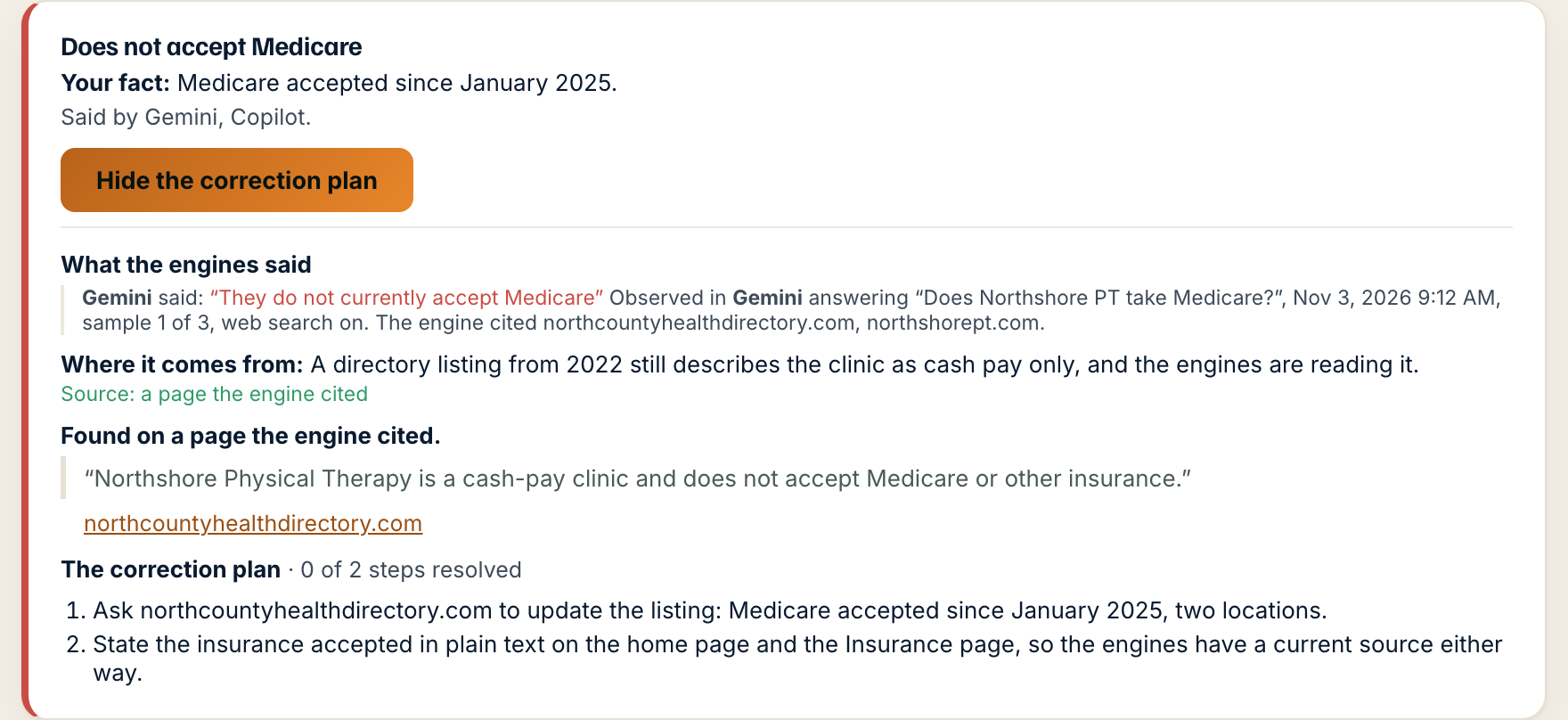
Step by step.
- Open the correction plan on an incorrect or out of date claim. Under Where it comes from, the line that names the source, the block starts with one of four lines.
- Found on a page the engine cited: the page is linked, and the one sentence on it that says the claim is quoted under it with the site named. At most three pages are shown; a line says how many more there are.
- The engines are quoting your own site: the page that says it is yours. Under the quote, the block says the fact we have on file is different and asks which is current. Press The page is right if the page is current and the fact sheet is behind. Press The fact on file is right if the sheet is current and the page needs correcting.
- Either choice sends a note to Eidomai on the claim's review trail and nothing else. A person reads it. Nothing on your fact sheet changes until they do, and nothing on your page changes at all.
- Once the source has been corrected, the block says so with the date. After the engines stop making the claim, it says how many days that took.
What happens next. The first step of the correction plan names the same page. Once it says the right thing, press Mark this correction complete, and the next monthly run shows whether the engines stopped.
A wrong claim is fixed at its source, and the correction plan already names the sources. Where this comes from shows the proof: the page the engine cited that carries the claim, and the one sentence on it that says so, quoted word for word with the site named. You see what the engine read before you ask anyone to change it.
When the page is your own, the block does not guess. It shows the sentence and asks which is current, the page or the fact on file. Your answer goes to a person on the claim's review trail. Nothing on the fact sheet changes until they have read it, and nothing on your site changes at all.
What the screen is telling you.
- The four states, in plain words. Found on a page the engine cited: we read the cited pages and one of them says it. The engines are quoting your own site: the page that says it is yours. We read the pages the engine cited and did not find this claim on them: the engine said it, but none of the pages it cited carries it, so the source is somewhere we were not pointed to. We could not read the pages the engine cited, so the source is not confirmed.
- Not found and not confirmed mean unknown, not innocent and not guilty. The correction plan still stands, and it starts with the sources you control: your own site and your profiles.
- The source was corrected on a date means the page that carried the claim was changed on that day, by you, by us or by its owner. The engines stopped saying this N days later is measured, not estimated: the days between that correction and the first run on which no engine made the claim. It sits beside the expected lag that was already printed, so you can see how the estimate compared.
- The engines have not caught up yet means the source is corrected and the claim still appears. Engines re-read their sources on their own schedules. For Google, a recrawl can be requested through Search Console.
- A page someone else owns is evidence, never a fact about you. One sentence is quoted per page, with the site named, so you can see for yourself what the engine read.
People ask.
- Which should I press, The page is right or The fact on file is right?
- Whichever is current today. If your site is right and your fact sheet is behind, press The page is right and we update the sheet. If the sheet is right and the page is stale, press The fact on file is right and the page goes on the correction plan. Both only send a note. A person at Eidomai reads it before anything changes.
- I pressed the wrong one.
- Press Send a note on the claim and say so. The note goes on the same review trail, and the person reading it sees both.
- The quoted sentence does not say what the engine said.
- The quote is the sentence on the page closest to the claim, taken word for word. If it does not support the claim, the page may not be the source after all. Say so with Send a note, and the next audit re-reads the sources.
- Why does a claim show no source line?
- The sources are read on the monthly audit. A claim found before this was added, or one whose correction plan is still being prepared, shows none yet. The block is switched on per account. If you want it and do not see it, send a support request.